Free
- Training Phases 1–3, with no expiry
- Guided squeeze and relax timing
- English and Thai support
- No ads; Apple Health is optional
 K-Core
Pelvic floor training
K-Core
Pelvic floor training
Follow guided squeeze and relax timing on iPhone or Apple Watch. K-Core supports English and Thai, without ads or a K-Core account.
Free download. Phases 1–3 are free; optional Plus purchases unlock more. iOS 17+; watchOS 10+.
No K-Core account or subscription is needed to begin. Compare features and privacy practices before downloading in our guide to choosing a pelvic floor training app.
Progression and recovery conditions still apply. Buying Plus does not make every training load immediately available. Apple shows the local price before you purchase.
English screenshots from the current App Store listing. K-Core also supports Thai.
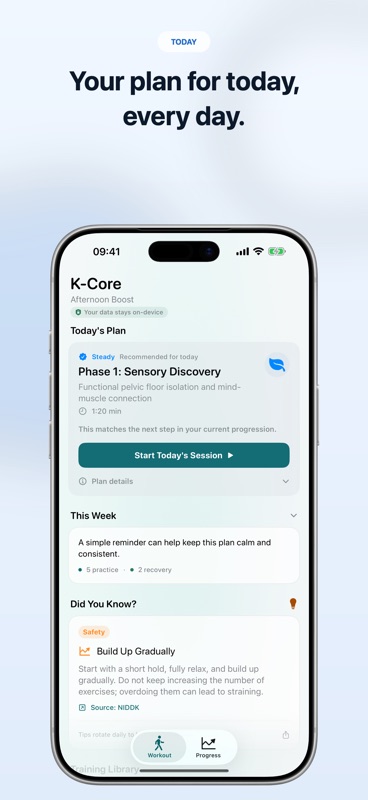
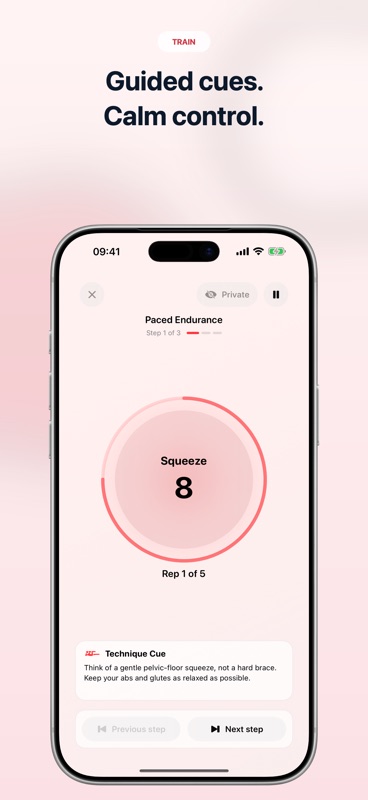
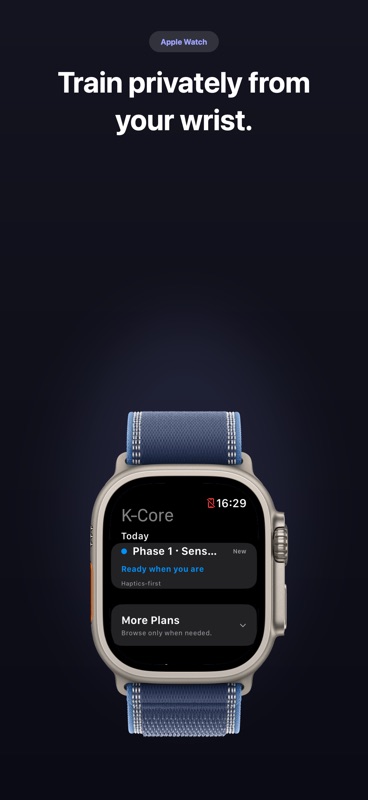
Compare language, squeeze and relax cues, privacy, free access and Apple Watch support before choosing a pelvic floor training app.
Read the guide →Start your first K-Core session on iPhone. Learn about onboarding, Today’s Plan, optional reminders and Apple Health, without a K-Core account.
Read the guide →Install K-Core on a paired Apple Watch, choose taps or sound, and understand sync, language and free versus Plus access.
Read the guide →Learn proper technique in 3 steps: locate the right muscles, maintain steady breathing, and prioritize the relax phase.
Read the guide →These sections cover the issues users usually need help with before contacting support.
Make sure you are using the latest App Store version and complete onboarding before your first session.
Health integration is optional and is requested only when you choose Connect Apple Health in K-Core Settings.
K-Core works best when the watch companion is installed and updated alongside the iPhone app.
If premium access does not appear after reinstalling or switching devices, use the restore option inside the app.
Structured sessions help users build consistency instead of guessing what to do next.
Run sessions with a more lightweight experience directly from the wrist.
Track routine history and keep momentum without a complicated setup.
Workout history and check-ins stay on your device. K-Core does not sync them through CloudKit. A paired Apple Watch exchanges app state with your iPhone; Apple Health is optional.
No. K-Core is a wellness and fitness app designed to support routine-building for pelvic floor exercises. It is not a medical device and does not replace professional medical advice, diagnosis, or treatment.
Open the premium or upgrade screen inside K-Core and tap Restore Purchases. If the issue continues, confirm that your device is signed into the same Apple ID that made the original purchase.
Open Settings → Privacy & Security → Health → K-Core and make sure the needed permissions are enabled. If you recently reinstalled the app, reopen K-Core after updating those settings.
Check that both iPhone and Apple Watch are on supported software versions, confirm the K-Core watch app is installed, and open the iPhone app once after updating. Keeping both devices nearby and unlocked can also help initial sync.
In the Apple Watch app, Workout Cues controls the cues K-Core plays during a workout. No Workout Cues turns off K-Core’s intentional workout cue taps and sounds. Taps Without Sound uses wrist taps without app sound cues. Taps + Sound adds sound cues, and Hold Start/End Only keeps cues minimal.
To mute Apple Watch alerts and sound effects more broadly, press the side button on Apple Watch to open Control Center, then turn on Silent Mode. Apple Watch may still use haptics depending on your Sounds & Haptics settings, and media volume is controlled separately.
Stop the workout and avoid pushing through pain. K-Core is for general wellness only. If you have symptoms, pain, post-surgery concerns, pregnancy-related questions, or other health issues, please consult a qualified healthcare professional.
No K-Core account, ads, or third-party tracking. Workout history and check-ins are stored on your device, and Apple Health is optional. Read the full details on the Privacy page.
K-Core is intended for general fitness and wellness purposes. For diagnosis, treatment decisions, pelvic pain, recovery concerns, or other medical questions, please talk to a licensed healthcare professional.
K-Core provides general wellness guidance based on linked public sources. It has not been clinically reviewed and does not provide individualized medical advice.
Sources last checked: .
For account, purchase, privacy, or app questions, contact the K-Core support team. Include your device model, iOS/watchOS version, and a short description of the issue to help speed things up.
For faster help, include your device model, iOS/watchOS version, and a short description of the issue.